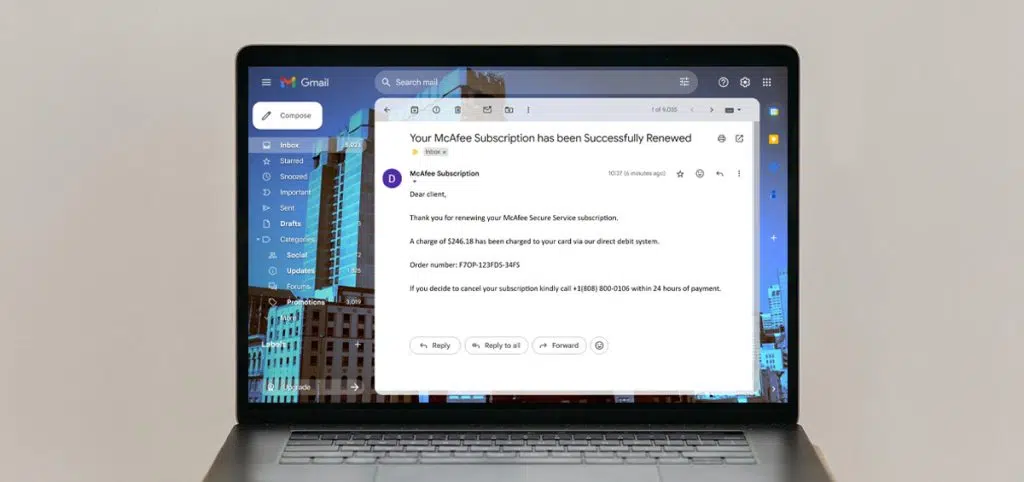

McAfee is a well-known name and trusted brand, protecting your devices and digital footprint from threats such as viruses, malware, phishing and ransomware.
So, when an email or pop up notification from “McAfee” appears, it’s safe to assume it’s legit, right? Unfortunately not.
Because McAfee is designed to protect users via its antivirus software and cybersecurity services, fraudsters take advantage, impersonating McAfee to steal information, login credentials and, ultimately, money. These scammers create a false sense of security through ruses, tricking people into revealing personal and sensitive information.
That’s why knowing the signs and understanding how to prevent a McAfee scam from happening is essential. Our guide will walk you through the above, as well as what to do if you’ve fallen victim to a McAfee scam, including your legal support options.
What Are the Laws on McAfee Scams in the UK?
Scams that falsely claim to be from McAfee – whether by email, pop-up alerts, online adverts or text messages – are a type of fraud, which is taken very seriously under UK law.
Most McAfee scams fall under the Fraud Act 2006, which makes it an offence to commit fraud by false representation. Fraudsters may, for example, pretend to be McAfee to pressure you into paying for fake antivirus subscriptions or handing over sensitive information.
Some scams may also breach the Computer Misuse Act 1990, especially where links or downloads are used to install malicious software onto your device. Additionally, if scammers unlawfully collect or misuse your personal details, the Data Protection Act 2018 could also apply.
Courts take these scams seriously, and penalties for offenders can include fines or even imprisonment. But for victims, the real concern is recovering their money.
However, while the law sets out strict rules against offenders, actually recovering money lost through McAfee scams can be complex. For this reason, many victims turn to specialist fraud recovery solicitors, who can help navigate the legal process, protect their rights and maximise the chances of getting their money back.
Tips for Recognising McAfee Scams
Throughout this section, we’ll advise you on the biggest red flags to watch out for to avoid falling for a McAfee scam.
Firstly, let’s start with the most common tactics – familiarising yourself with these can put you at a huge advantage, so you’re always one step ahead:
Most Common McAfee Scam Tactics:
1. Fake renewal emails
This includes messages claiming that your McAfee subscription is about to expire, suggesting that you will be at risk if you do not “renew now” via a link that takes you to a fake website designed to steal your payment details.
2. Pop-up warnings
Sudden alerts could pop up on your computer or browser stating your device is “at risk” or “infected” unless you renew McAfee immediately. These often come bundled in with other software or downloads – and is a type of malware.
3. Search engine ads
Fake adverts at the top of Google or Bing results pages that look like official McAfee sites can be convincing, but they actually lead to scam pages.
4. Fake invoices or receipts
Emails or text messages claiming you’ve already been charged for a McAfee subscription can then prompt you to click a link or call a number to dispute it, and request sensitive details. Scammers often use the invoicing tools of platforms like PayPal to send realisitic-looking “service agreement” contracts.
5. Tech support phone calls
Scammers posing as McAfee support agents may cold call you, claiming there’s an urgent problem with your account or device. They demand payment or remote access to your phone or computer, which will allow them full access to everything stored on your device and everything you do.
6. Malicious downloads
Links or attachments disguised as McAfee updates or installers could be used to install malware or spyware onto your device.
7. Social media ads or messages
Fraudulent promotions or “discount offers” could be circulating on platforms like Facebook or Instagram, leading to phishing websites designed solely to steal your personal information and payment details.
Common Signs of McAfee Scams
Scammers are clever and they know how to make their fake emails appear legitimate.
The scams will likely closely mimic official McAfee communications. They will include logos, brand colours and even email addresses that appear to be sent from McAfee themselves.
But how do you distinguish a fake McAfee notification from a legitimate one? Well, even scammers make mistakes…
- Language: Urgent language, such as “your device is at risk” or “immediate action required”, is designed to pressure you into responding quickly. Also, be on the lookout for poor grammar and spelling, especially if combined with an inconsistent tone that doesn’t quite fit with what you would expect from McAfee (e.g. too casual or aggressive).
- Suspicious sender address: If it’s an email scam, check the sender email address carefully – even slightly altered variations from the official domain can indicate it’s actually sent from a scammer. Scammers have been known to use slight variations of real addresses, like “name@macffee” or “[email protected]”.
- Mismatched branding: Look out for logos, colours or layouts that don’t quite match genuine McAfee communications, adverts or web pages, or strange formatting that doesn’t seem professional.
- Suspicious links or attachments: If you’ve received an email with unfamiliar links or that suggests you should download an attachment, they may lead to fake websites designed to steal your details or install malicious software.
- Unverified social accounts: Fake social media accounts could be created to encourage clicking on a fraudulent link, so look out for blue ticks or badges of verification to show legitimacy.
- “Suspected spam” calls: Sometimes, your phone will alert you if a number calling you has been listed as a “suspected scam”, so bear that in mind when answering any calls, especially if they claim to be a legitimate company, like McAfee.
Being able to identify a McAfee scam is one of the best ways to protect yourself. Learn more about how to spot a phishing email from our dedicated guide.
In short, trust your instincts. If something feels off, it probably is. It’s always safer to delete or ignore the scam and, if in doubt, contact McAfee directly using trusted details.
What McAfee Will Never Do
A simple way to protect yourself from McAfee scams is to understand what a genuine McAfee communication will never ask you to do.
Scammers rely on creating fake alerts, ads or emails to trick you into handing over money or information, but McAfee has clear security practices, meaning they will never:
- Ask you to share your password, bank details or card information through an email, pop-up, advert or phone call
- Pressure you with sudden warnings that your device is “infected” or “at risk” unless you act immediately
- Request that you download unexpected attachments or software updates via email or pop-up alerts
- Send you to websites that don’t begin with “https://www.mcafee.com/”
- Cold call you claiming to be “tech support”, asking for remote access to your computer
- Offer unrealistic discounts or promotions through social media links that redirect to suspicious sites
Note: McAfee legitimate pop-up notifications can be recognised through this helpful support article, which also provides examples of fakes to watch out for. McAfee also provide examples of email scams to help you spot impostors.
Reporting McAfee Scams
If you come across suspicious communications or targeting from “McAfee”, you should report it directly to McAfee.
You can forward any spam emails to [email protected]. Their security experts will be able to determine if it’s a fake and, if so, they’ll retrieve the source of the email and shut it down as quickly as possible.
You can also notify the UK government about scams and phishing attempts. GOV.UK provides clear instructions for forwarding suspicious emails or text messages, as well as information about how to report misleading advertisements or online fraud.
By taking the time to report scams, you’re not only helping authorities track and investigate fraudsters, but you can also prevent others from becoming victims of scams.
I’ve Been Scammed by a McAfee Imposter & Lost Money – What Do I Do?
If you’ve fallen victim to a McAfee scam – whether through a fake email, a dodgy pop-up, a convincing ad or even a phone call – you may be able to take steps to recover your money and protect yourself moving forward.
Before pursuing any kind of claim, it’s important to follow these steps:
1. Document the scam
As soon as you realise you’ve been targeted by a fraudulent McAfee message or ad, record as many details as possible.
Take screenshots of what you saw – whether it was a pop-up on your screen, a paid ad or a fake invoice. Save any email headers, URLs, or phone numbers used and note down if you entered personal or financial information.
The more evidence you have, the stronger your case will be for investigations and any potential claims later on.
2. Reporting the scam
Before taking further steps, make sure you’ve officially reported the scam to:
- McAfee directly: Forward the email to [email protected], so their security team can investigate and block the scam.
- Your email provider: If the scam came in the form of an email, platforms like Gmail or Outlook allow you to flag phishing attempts.
- Your bank: If you shared financial details, notify your bank immediately so they can monitor your account and stop any suspicious activity.
- The authorities: In England and Wales, report the scam to Action Fraud, the UK’s national centre for reporting cybercrime and fraud. You’ll receive a crime reference number, which may be needed for recovery or legal claims.
3. Secure your accounts
If you believe the scam email tricked you into sharing details, act quickly to secure your McAfee and linked accounts.
Change your password (and any reused passwords), enable two-factor authentication and check your account for unauthorised activity.
If your bank or phone details were exposed, contact your providers immediately. By acting quickly, this can reduce the risk of further fraud and help contain the damage.
4. Remove Any Suspicious Software
If you were told to download any software by the scammer, it’s very important that you take the device off of the internet and remove any new software immediately before running a security sweep using a tool like Malwarebytes, Windows Defender (installed by default on all Windows PCs) or even McAfee if you have a legitimate installation.
If you are unsure of how to do this, turn the device off and take it to somebody who can help, like a family member or expert.
Not doing so could allow the scammer full access to everything on your device and everything you do with it, including login details and passwords for online bank accounts and shopping platforms like Amazon or PayPal.
Making a Claim Against a McAfee Scam
Once you’ve gathered evidence of the McAfee scam – whether it came through a suspicious email, a fake pop-up or an online ad – the next question is whether legal action is worth exploring.
Here are the main routes of the claims process:
- Civil claims: If you’ve lost money, you may be able to bring a claim against the fraudster to try and recover your losses. In some cases, this can lead to compensation.
- Criminal investigations: For more serious scams, law enforcement or cybercrime units may step in. While this usually won’t get your money back, it can help shut down fraud networks and protect others from being targeted.
The reality is that scammers behind fake McAfee alerts often operate anonymously, use overseas servers and cycle through fake identities, making them very hard to trace. Because of this, legal action can be complicated – so it’s important to manage your expectations from the start of the claims process.
But you may be able to recover your money even if the scammer cannot be located.
Why Legal Expertise Matters
Having the right legal support by your side can make all the difference. A solicitor firm that specialises in scam and fraud recovery has the experience to maximise your chances of a successful claim.
Here at CEL Solicitors, we help victims of McAfee scams get their money back (sometimes with compensation).
Choosing CEL Solicitors for McAfee Scam Claims
Being scammed by a fraudster imitating a platform that prevents viruses, hackers and criminals from harvesting your data is a tough pill to swallow – and one that comes with emotional and financial stress. But you don’t have to face it alone.
CEL Solicitors specialise in fraud and scam recovery, with a strong track record of recovering millions for clients.
And with our No-Win, No-Fee promise, this means you won’t need to pay anything up front – giving you access to expert legal help you deserve with no financial risk.
Unsure about the strength of your case? Our expert consultation is completely free. We’ll listen, review your situation carefully and provide clear advice on your next steps.
Ready to pursue your McAfee scam claim? Get in touch today for a free, no-obligation consultation. Call 0333 305 4982 for the support you deserve. You are not alone. Just tell CEL.